Manual / Guide 8
Connect Telegram
Make a free Telegram bot with BotFather and paste its token into the shop. Telegram bots are official, so there is no ban risk as with WhatsApp.
1. Make the bot in Telegram
- In Telegram, search for @BotFather (it has a blue check mark) and open the chat.
- Send
/newbot. - BotFather asks for a name. This is what customers see, for example
Green Leaf Organics. - BotFather asks for a username. It must end in
bot, for exampleGreenLeafShopBot. If it is taken, try another. - BotFather replies with a token that looks like
123456789:AAH.... Copy it.
Never share the token. Anyone with it can read and send your bot's messages. Do not post it in a chat, a screenshot or an email. If it leaks, send /revoke to BotFather to get a new one, then paste the new one into the shop.
2. Paste the token into the shop
- Open Settings and scroll to Chat channels, or go to setup step 4.
- Paste the token into the box under Connect Telegram.
- Click Connect Telegram.
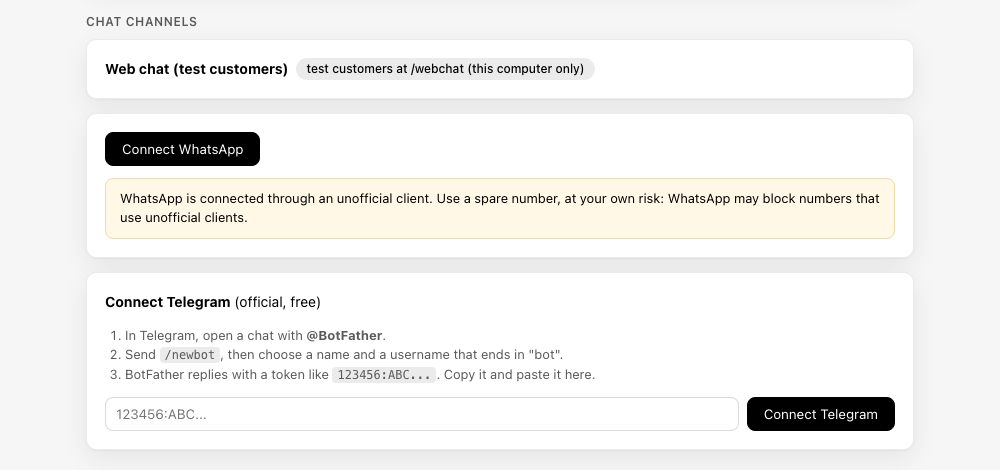
What you should see
- A Telegram bot row in the channels list with its status.
- Connected bot token: with only the start of the token shown, and a Remove button.
Customers find your bot by its username in Telegram, or with a link https://t.me/<username>. Share that link on your shop sign, cards or website.
If it goes wrong
- The bot does not answer. Check that the shop is running and the computer is online, and that you pasted the whole token.
- I pasted the wrong token. Click Remove, then paste the right one.
- Someone else got the token. Send
/revoketo BotFather, then paste the new token.