Your shop answers customers by itself. Free, on your own computer.
Customers reach you on WhatsApp or Telegram. OwnShop AI answers from your own Excel sheet and FAQ, takes orders and bookings, and tells them how to pay: UPI, payment link, QR code or bank transfer. No AI bill, no hosting, no domain.
Windows (x64 or ARM64) and Mac with Apple silicon. About 700 MB, the AI model is included.
Today you answer every message by hand.
"Price?" "In stock?" "Do you deliver on Saturday?" "Where is my order?" Your list lives in an Excel sheet and your shop lives in WhatsApp and Telegram chats. Every answer waits for you.
The usual fix costs money every month: a chatbot service, an AI subscription, a paid auto-reply tool, hosting and a domain for a shop website. OwnShop AI needs none of them.
Three steps, no technical person needed
Nothing to type in a terminal and no account to create. Everything happens in your browser, on your own computer.
Install
Double-click the download. OwnShop AI installs itself and opens the setup in your browser.
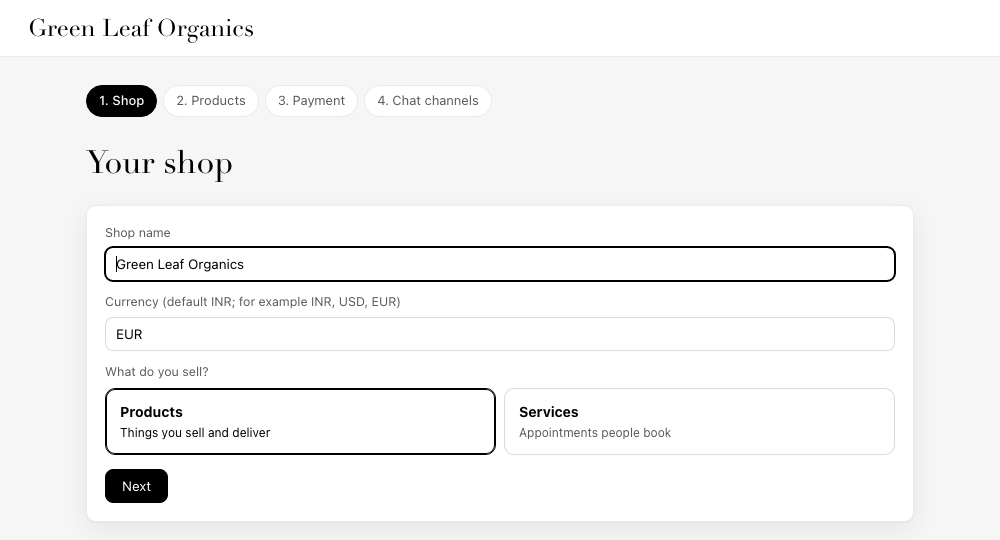
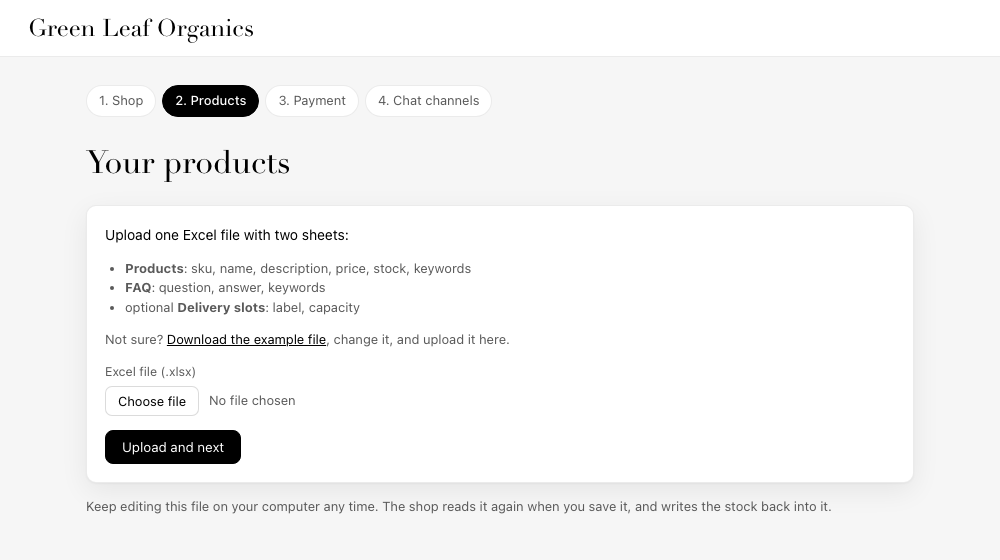
Upload your Excel sheet
Products, prices, stock and your own questions and answers. Or pick your business type for bookings.
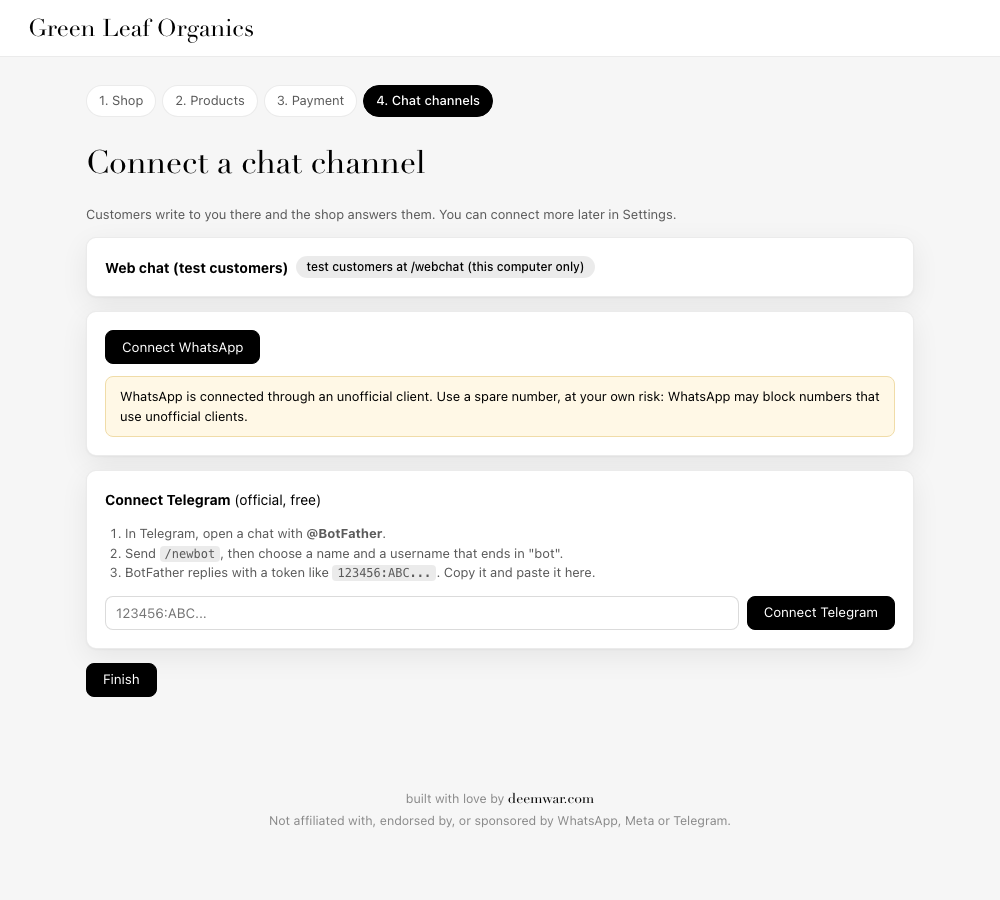
Connect WhatsApp or Telegram
Scan a code with your phone or paste a Telegram bot token. The built-in web chat works right away for testing: log in with any email or phone and a password.
Every step, with screenshots: the manual.
From install to the first order
A real run on a Windows PC with a demo shop: install, the setup steps, a customer asking for honey, the order, the payment request and the receipt.
About 4 minutes, no sound. The shop, products and payment details in the video are made up.
What it does for your customers
Every reply is filled in from your own data, so it does not invent a price or a policy. The small AI only decides what the customer wants.
Answers questions
Opening hours, delivery, returns: add a question once on the FAQ page (or in the FAQ sheet) and the shop answers it from then on, in your own words, before the AI is even asked.
Catalog and prices
Customers ask "do you have honey?" and get your products with photo, price and stock.
Takes orders
"add 2 raw honey" builds the order. It counts only after the customer replies YES.
Delivery slots
Customers pick from your slots, each with a limit you set.
Service bookings
Salons, tutors, clinics and repair visits: customers book a day and time, and you see it on a calendar.
How to pay
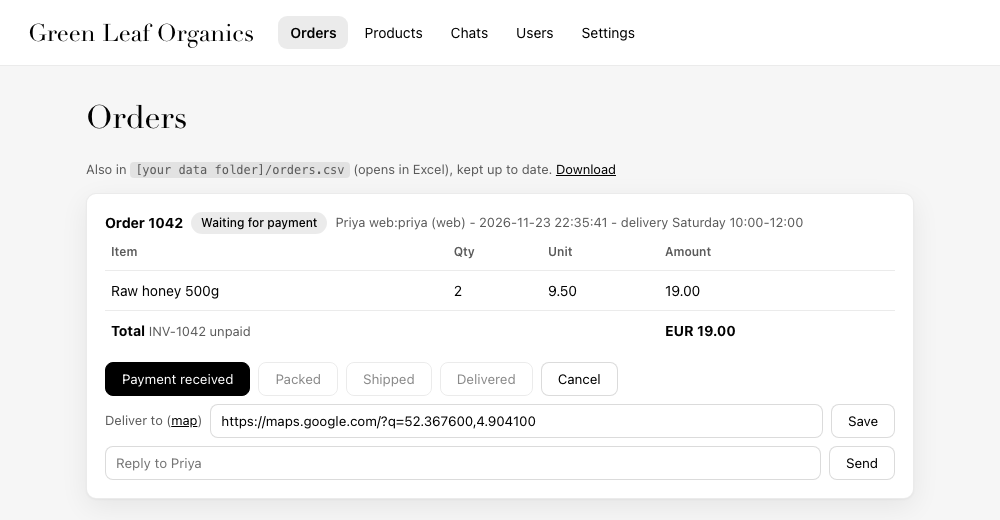
UPI (type your UPI ID once; every order gets its own UPI QR with the amount and order number filled in), a payment link, your QR code image or bank transfer details, with the invoice. Any currency. You confirm the money with one click and they get a receipt.
Order and booking status
"where is my order?" gets that customer's own status, and every change you make is sent to them.
Hands over to you
When it is not sure, or someone asks for a person, the customer is told you will reply, and the message waits for you. The customer is marked Needs support.
Every customer in one table
The Users page lists everyone who wrote, on WhatsApp, Telegram or the web chat, with orders and last visit. Filter, ban someone on every channel, or mark them resolved.
Stays polite
Only answers people who wrote first, at a human pace, with a daily cap. Never broadcasts.
Why it costs nothing
Your own computer is the server. You choose where customers can reach you.
- No AI subscription. A small AI model is built in and runs on your computer. Your chats are not sent to an AI company.
- No paid auto-reply service. It links to WhatsApp and Telegram directly.
- No hosting, no domain. The shop page and the web chat are served from your computer.
- Coming soon: your own web link. A free fixed link like name.ownshopai.store, so customers can chat from any browser and install the chat as an app on their phone.
- Open source. The code is published under the MIT license at github.com/ownshopai/ownshopai. No charges for the software, ever.
- Your data stays with you. Orders, products and chats are files on your computer.
Who it is for
Small shops
You sell from a list in Excel and take orders in WhatsApp or Telegram chats.
Home businesses
Food, crafts, cosmetics, plants: a few dozen products and customers who message you.
Bookings
Salons, tutors, clinics, consultants and repair visits that take appointments by chat.
Honest limits
Read these before you rely on it.
Your computer has to stay on and online
When it is off, asleep or offline, nobody gets a reply. Messages that arrived meanwhile are not answered in a burst later.
The WhatsApp link is unofficial
WhatsApp is linked through an unofficial client, and WhatsApp may block numbers that use one. Use a spare number. Telegram uses the official Bot API.
English only for now
Ordering and replies work in English. The model is small: in our test it picked the right action for 30 of 44 customer messages. When it is not sure, the message comes to you.
You check payments yourself
OwnShop AI never touches money and is not connected to a payment provider. You look at your bank or wallet and click Payment received.
Download OwnShop AI
One file per computer. It carries OwnShop AI, the WhatsApp client, the model server and the AI model.
Windows may say "Windows protected your PC": click More info, then Run anyway. The Mac app is not notarized yet; the Mac guide shows how to open it the first time. Step by step: install on Windows.
Questions
Is it really free?
Yes. It is open source under the MIT license, with no plan and no AI bill: the model runs on your computer. The only running cost is keeping your computer on and online.
Is my data safe?
Your products, orders and chats stay in files on your computer, and the AI runs there too. Messages travel only through WhatsApp or Telegram (and, once the free web link is live, Cloudflare) between your customers and your computer. Keep your computer itself secure and backed up.
Will WhatsApp ban my number?
It can. The WhatsApp link is unofficial, and WhatsApp may block numbers that use unofficial clients. OwnShop AI only answers people who wrote first, at a human pace, but that is no guarantee. Use a spare number, or use Telegram, which is official.
Do I need a website or domain?
No. Customers reach you on WhatsApp or Telegram. Coming soon: a free fixed web chat link like name.ownshopai.store, through Cloudflare's tunnel, that customers can also install as an app. Your computer has to stay on for the link to answer, and Cloudflare carries that traffic. See Put your chat on the web.
Do I need a technical person?
No. You download one file, double-click it, and do the setup in your browser. If you can edit an Excel sheet, you can run it. The manual has every step with screenshots.
What computer do I need?
A Windows 10 or 11 PC (x64 or ARM64) or a Mac with Apple silicon, with about 1.5 GB free disk space, about 1 GB of free memory while it runs, and an internet connection. It must stay on while you want customers answered.
Does it take payments?
No. It sends your payment details with the invoice: UPI (a QR made for each order from your UPI ID), a payment link, a QR code image or bank transfer text. You check that the money arrived and click Payment received.
I sell services, not products. Does it work?
Yes. Choose Services in the first setup step and pick your kind of business. Customers write things like "book Haircut" and pick a day and time.
Open source. Yours to keep.
MIT license. Read every line, run it, change it, or build your own version for your clients. If it helps your shop, a star helps other shops find it.
Support
Free help in the open, or premium support from deemwar when you want it done for you.
Free support
Questions, bugs and feature requests: raise an issue on GitHub. Everyone can see the answer, so the next shop gets it too.
Premium support
Setup done for you, priority help and custom features. Join the deemwar WhatsApp group and tell us what you need.
Let your shop answer while you work.
Free help: raise an issue on GitHub. Premium support, setup done for you and custom features: talk to deemwar.